
Temp-to-Hire Conversion Fees: How They Work and How to Calculate Them
When a client hires your temp, the conversion fee compensates you for the placement. Here's how buyout fees are structured, why they decline with hours worked, and a free calculator.
Ed Burtle · · 3 min read
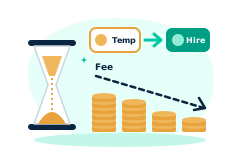
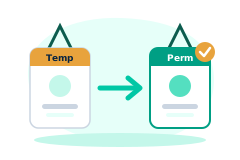
Temp-to-hire is one of the most common ways staffing works: you place a worker as your temporary employee, the client tries them out, and if it's a fit, they hire them permanently. The conversion fee (or "buyout") is what the client pays you when that happens, compensation for sourcing the worker and for the ongoing placement margin you give up.
Here's how conversion fees are typically structured, why most of them shrink the longer the temp has worked, and a free conversion fee calculator to model your own.
What a Conversion Fee Is (and Why It Exists)
When a client converts your temp to their own payroll, you stop billing for that worker's hours, and that recurring margin ends. The conversion fee bridges the gap: it's a one-time charge, usually a percentage of the worker's annual salary, that compensates you for the placement.
Base Conversion Fee = Annual Salary × Fee %
Base fees commonly run 10–20% of salary, though the number you can charge depends on your contract and how long the worker has already been on assignment.
Why the Fee Usually Declines With Hours Worked
Here's the part that surprises newer agencies: most conversion fees aren't flat. They're designed to shrink as the temp logs hours, and to waive entirely past a threshold, often around 1,000–1,500 hours.
The logic is fair to both sides: the longer a worker has been on your bill, the more margin you've already earned on their hours, so the buyout you need to make the placement worthwhile goes down. A common structure is a linear credit:
Effective Fee = Base Fee × (1 − Hours Worked ÷ Hours to Waiver)
A Worked Example
Say the role pays a $52,000 salary and your base conversion fee is 15%:
- Base fee = $52,000 × 15% = $7,800
Now suppose the temp has already worked 750 hours against a 1,500-hour full-waiver threshold, a 50% credit:
- Effective fee = $7,800 × (1 − 750 ÷ 1,500) = $3,900
The client pays half, because you've already earned margin on those 750 billed hours. Work all 1,500 and the buyout is $0.
Setting and Negotiating Your Terms
- Match the fee to your margin. If your bill/pay spread is thin, you need a longer waiver window or a higher base fee to make conversions worthwhile.
- Put the schedule in writing. The client agreement should spell out the base percentage and the hours-to-waiver so a conversion never turns into a dispute.
- Decide temp-to-hire vs. direct up front. The economics differ; our post on temp-to-hire vs. direct placement walks through when each makes sense.
Model Your Own
- Conversion Fee Calculator — salary, fee %, and hours worked in; the buyout due out.
- Placement Fee Calculator — the direct-hire equivalent, priced on first-year salary.
- Temp-to-Hire Staffing — how FreshStaff tracks hours, conversion eligibility, and fees in one place.
The Bottom Line
A conversion fee protects the margin you'd otherwise lose when a client hires your temp, and a well-designed declining schedule keeps it fair as the worker logs hours. Set the base percentage and the waiver window to match your economics, put both in the contract, and let your system track the hours so the fee is right on the day the client decides to convert.
For general benchmarking on temp-to-hire conversion practices, see the American Staffing Association's research and resources.
Conversion Fee Calculator
What to charge when a client “accidentally” hires your temp.
Run your numbers →About the Author
Ed Burtle
Ed Burtle is the founder of FreshStaff. He's spent 20+ years in enterprise IT, network administration, and cybersecurity across government, military, and private-sector roles, including building multiple employee onboarding systems and consulting on IT infrastructure for staffing agencies like 1st Choice Personnel and East Texas Staffing. He holds a CISSP (Certified Information Systems Security Professional) certification and is a U.S. Air Force veteran. That background, building and securing large-scale systems where reliability and compliance aren't optional for both government systems and the staffing agencies that actually run on this kind of software, shapes how FreshStaff is built: real encryption, real audit logging, and a payroll and compliance engine held to the same standard as the systems he's spent his career on, not bolted on as an afterthought.
More about FreshStaff →Related guides

How to Manage ACA Compliance for Staffing Agencies
How to manage ACA compliance for staffing agencies: full-time status for variable-hour and seasonal temps, look-back measurement periods, affordable offers of coverage, and where spreadsheet tracking breaks down.
Read the guide →
How AI Candidate Matching Cuts Time-to-Fill for Staffing Agencies
Time-to-fill determines whether a staffing agency wins or loses a client. How AI candidate matching shrinks it, and what to look for before trusting a tool.
Read the guide →
How Much Does an ATS Cost Per Recruiter? Per-Seat vs. Usage Pricing
Per-seat ATS pricing charges you for every login, not every placement. Here's the real math, a worked ROI example, and a free calculator to see your own annual savings.
Read the guide →