
Frequently Asked Questions
Everything you need to know about FreshStaff. Onboarding, automation, compliance, migration, and more.

In short: Frequently asked questions about FreshStaff cover what the platform is, how onboarding and automation work, what compliance and security features exist, which ATS platforms it migrates from, and how pricing works.
Pricing
What it costs, what's free, and what support comes with it.
6 questions
What support is available?
Email support is included with every account, at no extra cost. There are no support tiers to buy. See the Pricing page for details.
How much does FreshStaff cost?
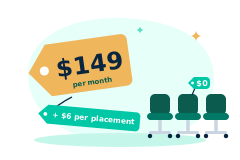
$149/month base, plus $6/month per Active Placement. That's the entire formula, there are no tiers, no per-internal-team-seat fees, and no add-on modules to buy. An agency with 10 Internal Team Seats and 50 Active Placements pays $449/month total ($149 + 50 x $6).
How is FreshStaff priced?
One plan, every feature, priced on Active Placements instead of user seats. The base fee ($149/month) includes unlimited Internal Team Seats and the entire platform. The only variable cost is $6/month per Active Placement, a field worker/temp who had a pay stub, logged hours, or was flagged Active on a job order that billing cycle. Full details are on the Pricing page.
Are Internal Team Seats unlimited?
Yes. Every FreshStaff account includes unlimited Internal Team Seats, recruiters, coordinators, and admins, at no extra cost. Add your whole team without it changing your bill, the only thing that affects pricing is how many Active Placements you have that month.
How much does ATS software cost per recruiter?
On most staffing ATS platforms you pay per recruiter seat, typically $60 to $165 per user each month, so the bill grows every time you add a recruiter. FreshStaff charges $0 per recruiter seat: Internal Team Seats are unlimited and free, and the only variable cost is $6/month per Active Placement.
Is there a staffing ATS with no per-seat fees?
Yes. FreshStaff has no per-seat or per-recruiter fees at all. Every recruiter, coordinator, and admin logs in on unlimited free Internal Team Seats. Pricing is a $149/month base plus $6/month per Active Placement, and adding users never changes your bill.
Switching & Setup
Moving your data over, what connects to what, and getting started.
4 questions
Which ATS platforms can FreshStaff migrate from?
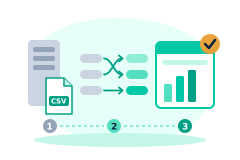
Bullhorn, Avionté, TempWorks, and several others, using guided field mapping and a full migration log. If something looks wrong afterward, a migration can be rolled back cleanly.
What integrations does FreshStaff support?
FreshStaff runs payroll natively, so you don't need a separate payroll provider. If you use one anyway, it generates payroll export files in ADP, Paychex, and Gusto formats, plus pay-card exports. For switching systems, the migration wizard recognizes CSV exports from Bullhorn, Avionté, TempWorks, JobDiva, and BambooHR automatically and matches columns from any other CSV. There are no live background-check, timekeeping, accounting, or cloud-storage integrations today.
How hard is it to switch staffing ATS platforms?
Switching to FreshStaff is guided and 100% free. Guided migration imports your candidates, clients, and job history from Bullhorn, Avionté, or TempWorks using field mapping, a full migration log, and a clean rollback if anything looks off. Because migration is included rather than sold as a paid add-on, most agencies are live on day one instead of spending weeks re-keying data.
How do I get started with FreshStaff?
Create a free workspace from the Get Started link on the Pricing page. No credit card is needed, and you only start paying once you place your first worker. You can also explore the Product Tour first to see the platform.
Onboarding, Payroll & Compliance
New-hire paperwork, I-9, W-4, E-Verify, and walk-in intake.
4 questions
How does onboarding work in FreshStaff?
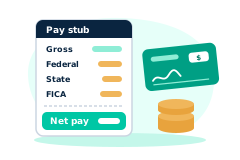
A new hire completes a guided digital flow, personal information, required documents, and e-signatures, in one sitting. Recruiters see live progress instead of waiting on a mailed packet.
How does FreshStaff track compliance?
I-9, W-4, and E-Verify status are all tracked automatically on every plan, visible on both an individual worker's profile and a company-wide compliance dashboard.
What is Kiosk Mode?
A self-service, full-screen intake experience for walk-in applicants on any shared front-desk device. No recruiter has to be free for an applicant to get started.
What are the Packet Builder and Document Builder?
The Document Builder turns an uploaded PDF into a fillable, e-signable form by mapping its fields. The Packet Builder assembles those documents into a reusable bundle, like a standard new hire packet, applied automatically to every new hire in a given role or client.
The Product
What FreshStaff is, who it's for, and what the main modules do.
6 questions
What is FreshStaff?
FreshStaff is a unified staffing platform that combines ATS, onboarding, automation, compliance, analytics, payroll, billing, and ATS migration into one system, replacing the fragmented point tools most staffing agencies piece together.
Who is FreshStaff built for?
Staffing agencies and internal workforce teams of any size, from a single branch operation to a multi branch agency managing hundreds of active placements.
Who founded FreshStaff?
Ed Burtle, a CISSP-certified enterprise IT and cybersecurity leader with 20+ years securing large-scale systems across government, military, and private-sector roles, including hands-on IT consulting for staffing agencies. See the About page for the full story.
What can automation rules actually do?
A rule pairs a real trigger (like a new applicant or a completed packet) with one or more actions (send an email or text, notify a recruiter, update a status, or schedule a follow-up). Any admin can build one directly, no support ticket required.
What does the analytics module show?
Five live dashboards: applicant funnel, placement velocity, onboarding completion, automation activity, and compliance accuracy, all computed from the same data the rest of the platform uses, with no export step.
What is the Client Portal?
A self-service login for your clients to see their own job orders, review applicants directly, and check active placements, without needing to call for a status update.
Security & Admin
How sensitive data is protected and who controls access.
2 questions
Is my staffing data secure?
Sensitive fields like SSNs are encrypted at rest, access is controlled through permission groups configured in Admin HQ that you define for your company, and every meaningful action is recorded in a searchable audit log.
What does Admin HQ control?
User accounts, custom permission groups, system health, and a complete audit log. The company-wide oversight center for owners and administrators.
Still have questions?
Send us your question and we will get back to you. Or take the product tour to see the platform first.
Try FreshStaff for Yourself
Free until your first placement. No credit card to start.