
Switch Platforms in Hours, Not Months.
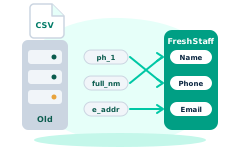
Export your data in seconds, and let the mapping wizard do the rest. It recognizes the major staffing platforms' exports and matches the columns of any other CSV for you to confirm.
Included in your $149/mo base plan, no separate migration fee.
Any CSV
Imports
$0
Migration Fees
Hours
Not Months
Bullhorn_Export.csv
FreshStaff Auto-Mapper
Recognizes columns, maps fields
How It Works
Export Your Data
Download your standard CSV/Excel data export from Bullhorn, Avionté, TempWorks, JobDiva, BambooHR, or whichever platform you're on.
One-Click Auto-Mapping
Upload the file into FreshStaff. Our system-aware migration engine recognizes the platform's typical column layout, instantly mapping Applicants, Job Orders, Clients, Notes, and Custom Fields into your new workspace.
100% Secure & Compliant
You retain complete ownership and control of your data throughout the export.
Zero Column-Matching Headache
You don't have to spend hours renaming headers in Excel. Our wizard recognizes Bullhorn, Avionté, TempWorks, JobDiva, and BambooHR exports automatically, and fuzzy-matches the columns of any other CSV for you to confirm.
$0 Migration Fees
Unlike legacy vendors who charge $5,000+ for implementation services, our guided wizard is completely free.
Migration Wizards & Data Entities
Every platform below imports the same 8 data entities. Tap a card to see the full checklist.
What Comes In, What Goes Out
Bring data in from your current ATS, and send payroll out in the file format your provider already accepts.
ATS & HR Data Imports
Auto-Recognized CSVBullhorn, Avionté, TempWorks, JobDiva, BambooHR
Any Other System
Guided Field MatchingAny CSV or Excel export with column headers
Payroll Provider Exports
Export FilesADP, Paychex, Gusto, pay cards
Don't see your specific software?
If it exports a CSV with headers, the wizard can map it. Not sure? Send us a sample of your column headers.
Send us your headers →Your Brand. Your Client & Worker Experience.
Your logo and brand colors carry across every client and candidate interaction, from the dashboard to the kiosk, so it always looks and feels like your own software.
Open Invoices
Your logo, your primary brand color, applied across the client and candidate portals.
Built for Every Staffing Vertical
Light Industrial
High-volume applicant and job order data mapped cleanly from Bullhorn or TempWorks exports.
Logistics & Warehousing
Driver and warehouse placement histories migrated without losing compliance history.
Construction
Trade certifications and job order history preserved during the switch.
Healthcare
Credentialing and compliance documents mapped intact from your legacy ATS.
Commercial Services
Recurring-contract client and placement data migrated in a single guided pass.
Migration Questions
How do migration wizards work for Bullhorn/Avionté?
Export your candidate, client, job order, and placement data from Bullhorn, Avionté, or your current ATS as a standard CSV/Excel file, then upload it into FreshStaff. The wizard recognizes that platform's typical column layout and auto-maps the fields, with a sandbox preview before anything imports into your live workspace.
Is there a fee to migrate?
No. The guided migration wizard is included at no extra cost, unlike legacy vendors that charge $5,000 or more for implementation services.
Which platforms does the migration engine support?
Bullhorn, Avionté, TempWorks, JobDiva, and BambooHR exports are recognized automatically. Any other system that exports CSV or Excel works too: the wizard fuzzy-matches its columns and you confirm the mapping before anything imports.
Is my data safe during the export?
Yes. You retain complete ownership and control of your data throughout the process, you're exporting your own file from your own system and uploading it directly into your own FreshStaff workspace.
Keep Exploring
All 29 features →
Admin HQ
Users, roles, permissions, and branches for the whole agency, in one place.
Learn more →
AI Theme Designer
Generate, edit, and preview a fully branded dashboard theme, with built-in AA contrast checking.
Learn more →
Client Intelligence Hub
GPS auto-capture, territory heatmaps, route planning, and an AI sales assistant for field reps.
Learn more →