Copilot Actions
A priority list is only useful if acting on it doesn't mean leaving it. Every item Copilot surfaces carries a real, contextual action. One click, one confirm, done, built on the exact same tools the rest of FreshStaff already runs on.
In short
FreshStaff Copilot Actions attaches one click, contextual actions to every priority item, running through the platform's existing tools rather than a separate automation system.
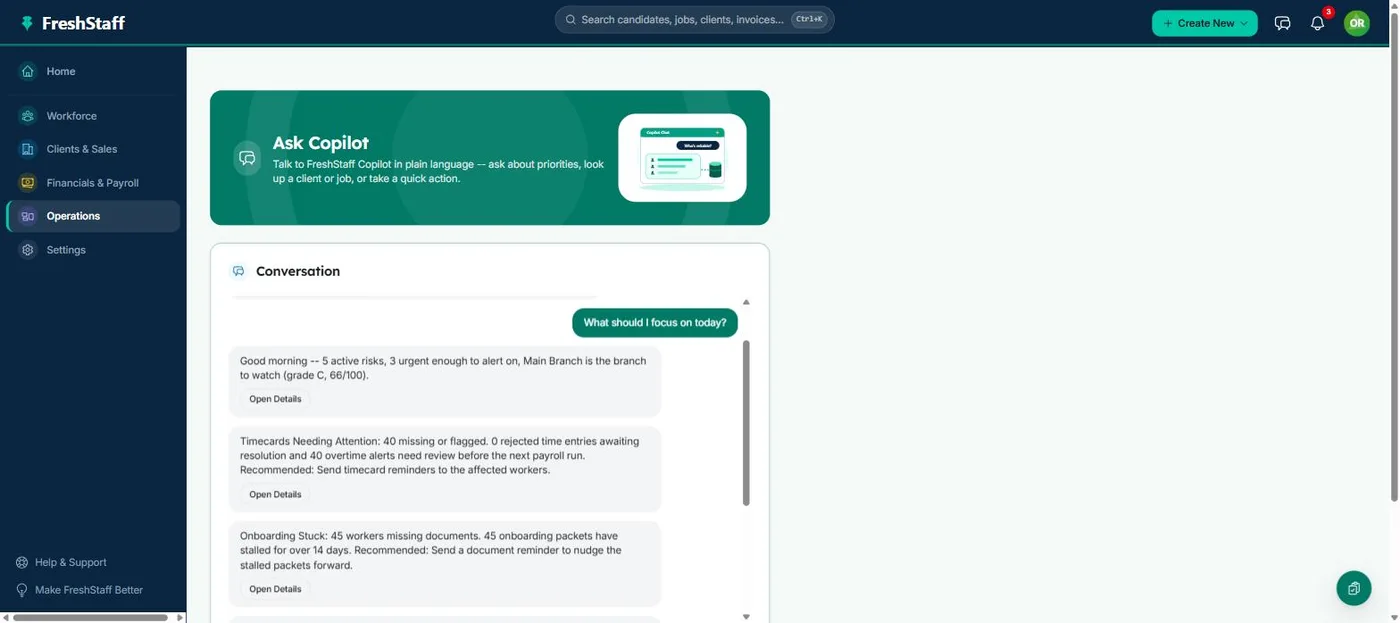
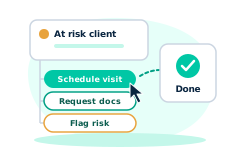
Knowing what needs attention is only half the job. The other half is actually doing something about it without a five click detour through a different part of the platform. Copilot Actions closes that gap. Schedule a sales visit, recommend a worker for an open job, request missing documents, boost a stalling job's visibility, or flag a placement risk, all from the same priority item that surfaced the need in the first place.
Why staffing teams need it
A recommendation without a next step is just one more thing to remember. If Copilot tells a recruiter that a client hasn't been visited in a month, but the only way to act is to navigate away, find the client, find the visit form, and fill it out from scratch, most of that momentum is lost before the action ever happens.
Attaching a real action directly to the insight that generated it is what actually changes behavior day to day. The shortest path between 'here's a problem' and 'it's handled' is a single click, not a multi screen detour.
How FreshStaff builds it
Every Copilot Action is a direct shortcut to a tool that already exists elsewhere in the platform. Scheduling a visit uses the same feature the Sales Visits page uses, recommending a worker uses the same matching logic Job Order pages already show, requesting documents uses the existing document request flow. Nothing here is built from scratch, it's the shortest path to an action FreshStaff can already take.
Actions that need more than a single confirm, like picking a specific date for a visit, or choosing which documents to request, open a small, focused window scoped to exactly that action, then bring you straight back to the priority list once it's done.
How It Works
- 1
Open Copilot and review the priority list (see Copilot Priorities for how it's ranked).
- 2
Each item shows the one or two actions that make sense for it. Schedule a visit, recommend a worker, request documents, boost visibility, or flag risk.
- 3
Click an action. If it needs more detail, a focused window collects exactly that and nothing else.
- 4
The action runs through the platform's existing tool for that job, and the priority list updates to reflect it.
Why It Matters
Turning insight into action in one click is what actually gets the daily priority list acted on, instead of read and set aside.
Because every action reuses a tool staff already trust, there's no new system to learn and no new place for something to go wrong. It's the same schedule a visit or request documents flow staff already know.
Copilot Actions in FreshStaff
How Copilot Actions Compares
| Capability | FreshStaff | Legacy ATS | Manual Processes |
|---|---|---|---|
| Act on a priority item | One click, in context | Not available | Navigate to a separate screen |
| New systems to learn | None, existing tools | N/A | N/A |
| Action-specific detail capture | Focused window per action | N/A | Whatever form exists for that task |
| Return to priority list after acting | Automatic | N/A | Manual |
Explore More Features
Client Intelligence Hub
GPS auto-capture, territory heatmaps, route planning, and an AI sales assistant for field reps.
Universal Command Center
A Cmd+K command bar for instant navigation, one-step actions, and quick status queries.
Native Payroll & Compliance Engine
Federal/state withholding, FICA, SUTA/FUTA, ACA offer and safe-harbor codes, and 1095-C generation, built in.
Territory Intelligence
Heatmaps, category layers, clustering, and shared-building grouping on a live territory map.
AI Visit Planning
Scores nearby clients and builds an optimized route from your current location.
Daily Route Auto-Generator
One click, no setup. Today's route, GPS based, with today's visits already excluded.
Category-Based Routing
Restrict a route to just Healthcare, Industrial, or Professional Services leads.
Lead Scoring Engine
Ranks nearby companies by category, confidence, proximity, and shared-building context.
Route Optimization
Free, offline route reordering. Haversine distance and 2-opt, no routing API.
Onboarding
Guided digital onboarding from offer to first shift.
Automation
Rules-based automation across recruiting and onboarding.
Analytics
Real-time dashboards for fill rate, compliance, and velocity.
Migration Engine
Guided, field-mapped migration off legacy ATS platforms.
Integrations
Connected payroll, background check, and timekeeping providers.
Admin HQ
Tenant-wide users, permissions, and system oversight.
Packet Builder
Reusable document packets for every placement type.
Document Builder
Upload, map, and publish fillable onboarding documents.
Compliance
I-9, W-4, and E-Verify tracking that stays audit-ready.
Client Portal
Client-facing job orders, approvals, and placement visibility.
Kiosk Mode
Walk-in applicant intake on a shared front-desk device.
System Health
Job runner, queue, and error visibility for system admins.
Copilot Priorities
A ranked daily list of what needs attention across clients, jobs, and placements.
Copilot Conversations
Ask Copilot in plain language and get a real answer from your own data.
Copilot Memory
Copilot remembers what you were just looking at, so follow-ups just work.
Copilot Workflow Builder
Describe a workflow in plain language and Copilot drafts the steps.
Smart Command Bar
One command bar for navigation, search, and natural-language questions.
Copilot Voice Input
Speak a command to Copilot instead of typing it.
ATS Intelligence
Watches your ATS around the clock, catches problems automatically, and fixes them within limits you set.
Reliability & Availability Intelligence
Persistent reliability trend history and 14-day availability forecasting, computed nightly and fed straight into Copilot.
Worker Reliability
A weighted attendance-risk score for every worker, computed from real placement history.
Worker Availability
See which workers are actually free today before you ever open a job order.
Compliance & Onboarding Packets
Reusable document packets, I-9/W-4 tracking, and client-specific onboarding rules.
Safety & Job-Site Readiness
Digital safety inspections and job equipment tracking, gated before dispatch.
Training & Credential Tracking
A built-in candidate LMS and credential repository, tracked to expiration.
Sales Visit & CRM Intelligence
GPS-logged sales visits and Google Places business auto-enrichment.
Client Credit Management
Real-time client credit limits, applications, and exposure alerts.
Time Tracking & Workforce Hours
Mobile time entry and approval workflows that flow into native payroll.
AI Theme Designer
Generate, edit, and preview a fully branded dashboard theme, with built-in AA contrast checking.
Theme Pack Marketplace
Install official and community theme packs, rated and curated, with one-click rollback.
AI Brand Evolution
Evolve, mutate, and merge your theme pack over time, with full version history and style trends from other agencies.