FreshStaff

Document Builder

Upload any PDF and turn it into a fillable, e-signable onboarding document. Field mapping and signature zones get placed right on the page, automatically.
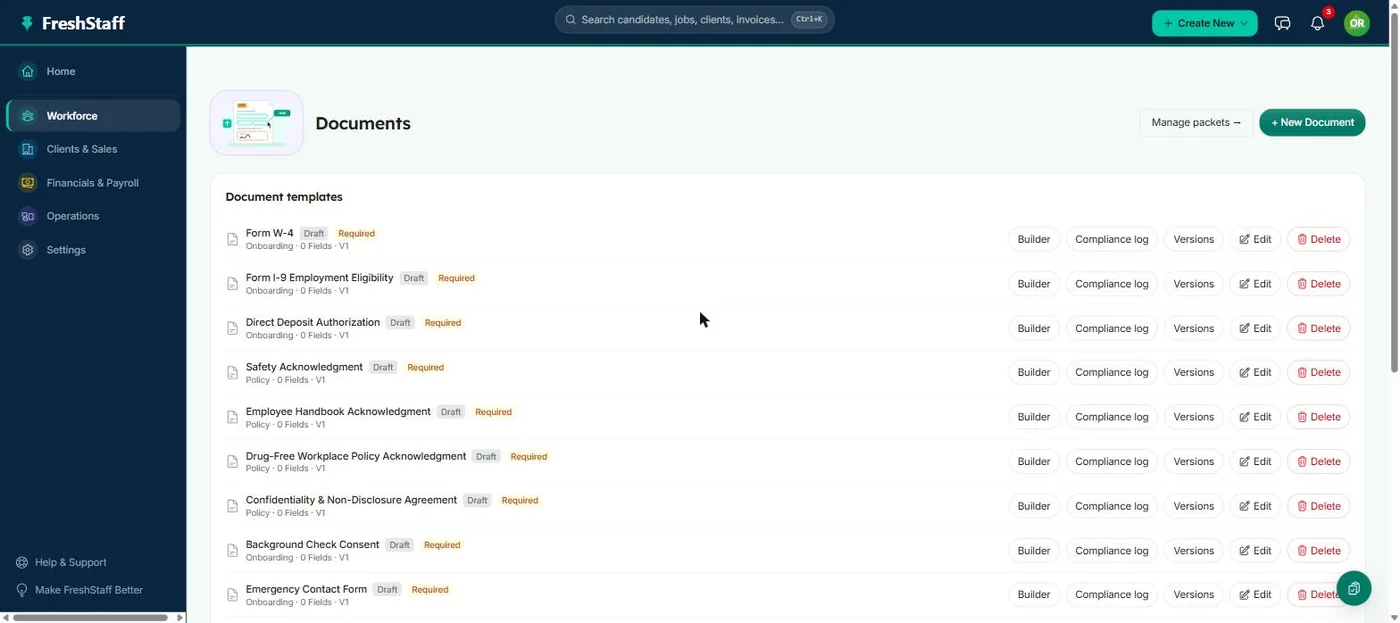
FreshStaff Document Builder: the Documents page showing document templates.

In short

FreshStaff's document builder turns an uploaded PDF into a fillable, e-signable onboarding document by figuring out where its text and signature fields belong, right on the page.

document builderfield mappingsignature fieldsfillable PDF

Every onboarding packet is built from individual documents, and those documents have to come from somewhere, usually a PDF a client or a state agency already hands you. FreshStaff's document builder takes that PDF as-is and figures out exactly where each field and signature belongs, turning a static form into something a new hire can fill out and sign on any device.

Why staffing teams need it

Onboarding forms rarely come in a format built for digital completion. They're PDFs made to be printed. Rebuilding every one of those forms from scratch as a digital form would be a huge, ongoing project. The document builder instead works with the PDF an agency already has.

State-issued and client-issued forms also change from time to time, and an agency has no control over when that happens. A tool that works with whatever PDF shows up next, instead of requiring a rebuild from scratch, is what makes staying current with those changes realistic instead of a recurring headache.

How it works

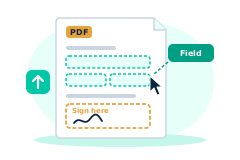
An admin uploads a PDF, and the document builder spots fillable fields directly on the rendered page, text fields, checkboxes, dates, and signature zones, placed exactly where they visually belong on the form. Once mapped, that document becomes a reusable template that can be dropped into any packet.

Because mapping happens visually, right on top of the rendered PDF, an admin doesn't need any technical background to get it right. If a field's box is in the wrong spot, it's obvious at a glance and easy to drag into place, the same way it would be obvious on a printed page.

How it compares to a legacy ATS

Most legacy platforms only support attaching a static PDF for a candidate to download, print, and mail back. There's no field mapping at all. FreshStaff's document builder is what makes the rest of onboarding's e-signature flow possible in the first place. Without mapped fields, there's nothing for a new hire to fill in digitally.

That gap is why legacy onboarding so often falls back to paper right at the point where a form is unusual or client specific. A generic ATS has no way to make a one-off form fillable, while FreshStaff's document builder handles a one-off form exactly the same way it handles a standard one.

Speed, accuracy, and compliance

A correctly mapped document makes sure every required field actually gets captured, nothing left blank because a printed form's instructions were unclear. Signature zones placed precisely on the form also mean the signed document looks and reads exactly like the original, which matters for anything a client or auditor needs to review later.

A signed document that reads exactly like the original form also means there's never a question of whether the signing process changed the legal document itself. It's the same form, filled in digitally, which is exactly what a client or state agency expects to see.

How it connects with the rest of FreshStaff

Document templates built here are the building blocks the Packet Builder assembles into reusable packets, and the fields mapped here are exactly what a new hire fills in during onboarding. Required compliance documents built with the document builder are what Compliance tracks status against.

This is the foundation the rest of onboarding is built on. Nothing about the packet builder or the guided onboarding flow works without a correctly mapped document underneath it, which is why getting this step right pays off across every module downstream of it.

How It Works

  1. 1

    An admin uploads a PDF, a state form, a client policy, or an internal document.

  2. 2

    The document builder renders the PDF and the admin maps each field directly on the page.

  3. 3

    Signature zones get placed exactly where a signature belongs on the original form.

  4. 4

    The mapped document is saved as a reusable template.

  5. 5

    That template gets added to one or more packets, ready for a new hire to fill out and sign.

Why It Matters

Onboarding's entire digital, guided experience depends on documents actually being fillable. The document builder is the step that makes that possible for forms an agency didn't design itself, which is nearly all of them.

A form that's mapped correctly the first time removes an entire category of onboarding friction, like a new hire who can't tell where to sign, or a required field that gets skipped because the paper version's instructions were unclear.

Document Builder in FreshStaff

How Document Builder Compares

How Document Builder compares to legacy ATS platforms and manual processes
CapabilityFreshStaffLegacy ATSManual Processes
Document formatFillable, e-signableStatic PDF attachmentPrinted paper
Field mappingAutomatic, right on the pageNot supportedN/A
Signature placementExact, matches originalN/AWherever there's room
ReusabilityTemplate, used in any packetRe-uploaded each timeRe-printed each time

Explore More Features

Client Intelligence Hub

GPS auto-capture, territory heatmaps, route planning, and an AI sales assistant for field reps.

Universal Command Center

A Cmd+K command bar for instant navigation, one-step actions, and quick status queries.

Native Payroll & Compliance Engine

Federal/state withholding, FICA, SUTA/FUTA, ACA offer and safe-harbor codes, and 1095-C generation, built in.

Territory Intelligence

Heatmaps, category layers, clustering, and shared-building grouping on a live territory map.

AI Visit Planning

Scores nearby clients and builds an optimized route from your current location.

Daily Route Auto-Generator

One click, no setup. Today's route, GPS based, with today's visits already excluded.

Category-Based Routing

Restrict a route to just Healthcare, Industrial, or Professional Services leads.

Lead Scoring Engine

Ranks nearby companies by category, confidence, proximity, and shared-building context.

Route Optimization

Free, offline route reordering. Haversine distance and 2-opt, no routing API.

Onboarding

Guided digital onboarding from offer to first shift.

Automation

Rules-based automation across recruiting and onboarding.

Analytics

Real-time dashboards for fill rate, compliance, and velocity.

Migration Engine

Guided, field-mapped migration off legacy ATS platforms.

Integrations

Connected payroll, background check, and timekeeping providers.

Admin HQ

Tenant-wide users, permissions, and system oversight.

Packet Builder

Reusable document packets for every placement type.

Compliance

I-9, W-4, and E-Verify tracking that stays audit-ready.

Client Portal

Client-facing job orders, approvals, and placement visibility.

Kiosk Mode

Walk-in applicant intake on a shared front-desk device.

System Health

Job runner, queue, and error visibility for system admins.

Copilot Priorities

A ranked daily list of what needs attention across clients, jobs, and placements.

Copilot Actions

One-click actions attached to every Copilot priority. No separate screen required.

Copilot Conversations

Ask Copilot in plain language and get a real answer from your own data.

Copilot Memory

Copilot remembers what you were just looking at, so follow-ups just work.

Copilot Workflow Builder

Describe a workflow in plain language and Copilot drafts the steps.

Smart Command Bar

One command bar for navigation, search, and natural-language questions.

Copilot Voice Input

Speak a command to Copilot instead of typing it.

ATS Intelligence

Watches your ATS around the clock, catches problems automatically, and fixes them within limits you set.

Reliability & Availability Intelligence

Persistent reliability trend history and 14-day availability forecasting, computed nightly and fed straight into Copilot.

Worker Reliability

A weighted attendance-risk score for every worker, computed from real placement history.

Worker Availability

See which workers are actually free today before you ever open a job order.

Compliance & Onboarding Packets

Reusable document packets, I-9/W-4 tracking, and client-specific onboarding rules.

Safety & Job-Site Readiness

Digital safety inspections and job equipment tracking, gated before dispatch.

Training & Credential Tracking

A built-in candidate LMS and credential repository, tracked to expiration.

Sales Visit & CRM Intelligence

GPS-logged sales visits and Google Places business auto-enrichment.

Client Credit Management

Real-time client credit limits, applications, and exposure alerts.

Time Tracking & Workforce Hours

Mobile time entry and approval workflows that flow into native payroll.

AI Theme Designer

Generate, edit, and preview a fully branded dashboard theme, with built-in AA contrast checking.

Theme Pack Marketplace

Install official and community theme packs, rated and curated, with one-click rollback.

AI Brand Evolution

Evolve, mutate, and merge your theme pack over time, with full version history and style trends from other agencies.