FreshStaff

Worker Availability

Know who's actually free today, before a client calls asking why a shift wasn't covered, computed straight from active placements and scheduling data, not a spreadsheet someone forgot to update.
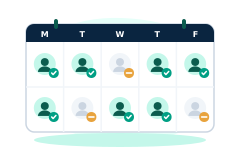
FreshStaff Worker Availability: the available workers list with availability and reliability scores.

In short

FreshStaff Worker Availability computes which workers are genuinely free today from active placements and scheduling data, shown in a dedicated panel and right on job order pages.

worker availabilityshift conflict detectionstaffing fill ratescheduling

Filling a job order fast means knowing who's genuinely available right now, not who was available the last time someone checked. Worker Availability replaces the manual cross check against placements and schedules with a live, computed answer, shown right where you're filling a job.

Why staffing teams need it

The classic mistake is proposing a worker for a shift who's already booked elsewhere, or who's on approved time off. Easy to do when availability lives in someone's head or a spreadsheet that's a day out of date.

A branch running a dozen placements at once can't rely on memory to know who's free right now. Worker Availability computes the answer directly from the same active placement and scheduling data FreshStaff already tracks, so it's never out of date.

How FreshStaff builds it

The availability engine checks each worker's active job assignments, scheduled shifts, and any recorded time off, then flags who's genuinely free for a given date. It reuses the same placement and scheduling data that already runs the rest of FreshStaff, not a separate system that can drift out of sync.

That result shows up two ways: a standalone Available Workers panel for browsing who's free, and inline suggestions right on the job order page you're already filling, so acting on availability never means a separate lookup.

Now with a 14-day forecast

This same real availability signal is what Reliability & Availability Intelligence projects forward every night, into a persisted 14-day forecast that feeds Copilot's priority feed and the Replace Worker, Adjust Schedule, and Alert Manager actions. Linked below under Explore More Features.

How It Works

  1. 1

    Open a job order or the Available Workers panel. No separate scheduling tool to check first.

  2. 2

    FreshStaff cross-references each worker's active placements, scheduled shifts, and recorded time off for the date you need.

  3. 3

    Workers with a conflict get excluded automatically. Everyone else shows as available.

  4. 4

    Suggestions appear right on the job order, so assigning an available worker takes one step, not a lookup followed by an assignment.

Why It Matters

Fewer double bookings and missed shifts, because availability is computed from live data instead of memory or a spreadsheet that's already stale.

Faster fills, because you see who's available right where you're already deciding who to place, not after switching to a separate scheduling screen.

Worker Availability in FreshStaff

How Worker Availability Compares

How Worker Availability compares to legacy ATS platforms and manual processes
CapabilityFreshStaffLegacy ATSManual Processes
Availability sourceComputed live from placements and schedulingNot availableSpreadsheet or memory
Where it's shownDedicated panel plus inline on job ordersN/ASeparate lookup required
Conflict detectionAutomatic, active placements and time offN/AManual cross-check
FreshnessAlways currentN/AAs current as the last update

Explore More Features

Client Intelligence Hub

GPS auto-capture, territory heatmaps, route planning, and an AI sales assistant for field reps.

Universal Command Center

A Cmd+K command bar for instant navigation, one-step actions, and quick status queries.

Native Payroll & Compliance Engine

Federal/state withholding, FICA, SUTA/FUTA, ACA offer and safe-harbor codes, and 1095-C generation, built in.

Territory Intelligence

Heatmaps, category layers, clustering, and shared-building grouping on a live territory map.

AI Visit Planning

Scores nearby clients and builds an optimized route from your current location.

Daily Route Auto-Generator

One click, no setup. Today's route, GPS based, with today's visits already excluded.

Category-Based Routing

Restrict a route to just Healthcare, Industrial, or Professional Services leads.

Lead Scoring Engine

Ranks nearby companies by category, confidence, proximity, and shared-building context.

Route Optimization

Free, offline route reordering. Haversine distance and 2-opt, no routing API.

Onboarding

Guided digital onboarding from offer to first shift.

Automation

Rules-based automation across recruiting and onboarding.

Analytics

Real-time dashboards for fill rate, compliance, and velocity.

Migration Engine

Guided, field-mapped migration off legacy ATS platforms.

Integrations

Connected payroll, background check, and timekeeping providers.

Admin HQ

Tenant-wide users, permissions, and system oversight.

Packet Builder

Reusable document packets for every placement type.

Document Builder

Upload, map, and publish fillable onboarding documents.

Compliance

I-9, W-4, and E-Verify tracking that stays audit-ready.

Client Portal

Client-facing job orders, approvals, and placement visibility.

Kiosk Mode

Walk-in applicant intake on a shared front-desk device.

System Health

Job runner, queue, and error visibility for system admins.

Copilot Priorities

A ranked daily list of what needs attention across clients, jobs, and placements.

Copilot Actions

One-click actions attached to every Copilot priority. No separate screen required.

Copilot Conversations

Ask Copilot in plain language and get a real answer from your own data.

Copilot Memory

Copilot remembers what you were just looking at, so follow-ups just work.

Copilot Workflow Builder

Describe a workflow in plain language and Copilot drafts the steps.

Smart Command Bar

One command bar for navigation, search, and natural-language questions.

Copilot Voice Input

Speak a command to Copilot instead of typing it.

ATS Intelligence

Watches your ATS around the clock, catches problems automatically, and fixes them within limits you set.

Reliability & Availability Intelligence

Persistent reliability trend history and 14-day availability forecasting, computed nightly and fed straight into Copilot.

Worker Reliability

A weighted attendance-risk score for every worker, computed from real placement history.

Compliance & Onboarding Packets

Reusable document packets, I-9/W-4 tracking, and client-specific onboarding rules.

Safety & Job-Site Readiness

Digital safety inspections and job equipment tracking, gated before dispatch.

Training & Credential Tracking

A built-in candidate LMS and credential repository, tracked to expiration.

Sales Visit & CRM Intelligence

GPS-logged sales visits and Google Places business auto-enrichment.

Client Credit Management

Real-time client credit limits, applications, and exposure alerts.

Time Tracking & Workforce Hours

Mobile time entry and approval workflows that flow into native payroll.

AI Theme Designer

Generate, edit, and preview a fully branded dashboard theme, with built-in AA contrast checking.

Theme Pack Marketplace

Install official and community theme packs, rated and curated, with one-click rollback.

AI Brand Evolution

Evolve, mutate, and merge your theme pack over time, with full version history and style trends from other agencies.